
CRA My Account benefits and credits: where to find each payment
Short answer
In CRA My Account, benefits and credits are on the Overview screen of your individual account: select Benefits and credits to see each CRA payment, your next payment and the notices behind the amounts. The same page lets you apply for the Canada Child Benefit and sign up for reminders about one week before a payment. CPP and OAS are not shown there.
- 01Where to click
- Individual account, Overview, Benefits and credits
- 02Payment reminders
- About one week before each payment
- 03Who can register
- Anyone with a SIN and an assessed return for the current or previous year
- 04Sign-in options
- CRA user ID, Sign-In Partner (online banking) or BC and Alberta provincial partner
- 05Not in My Account
- CPP, OAS, GIS and the Canadian Dental Care Plan (use My Service Canada Account)
Where are benefits and credits in CRA My Account?
CRA My Account is the Canada Revenue Agency's online portal for your personal tax and benefit information. To reach the benefits and credits page, sign in to your CRA account, choose your individual account, and select Benefits and credits on the Overview screen, the same path the CRA gives for applying for the Canada Child Benefit (CRA, how to apply for the CCB).
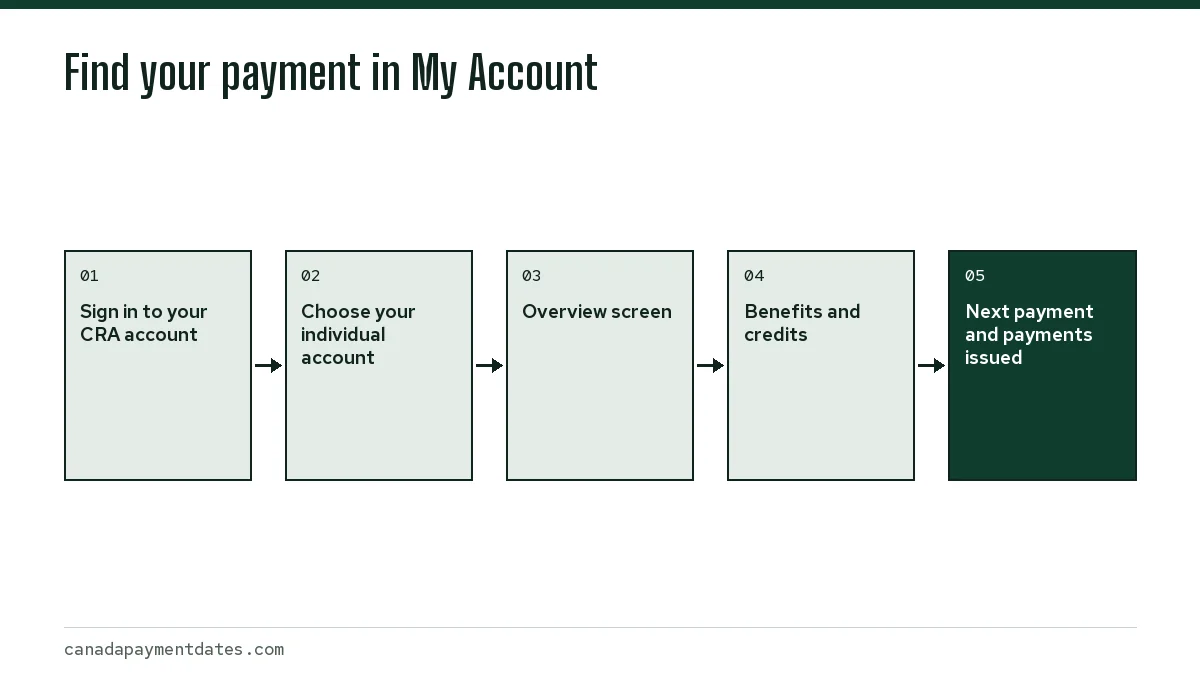
The page groups every CRA-paid benefit you receive: the Canada Child Benefit (CCB), the Canada Groceries and Essentials Benefit (CGEB), Advanced Canada Workers Benefit payments, and provincial amounts the CRA delivers for your province, such as the Ontario Trillium Benefit. If a program does not appear, the CRA has not found you eligible for the current July to June benefit year.
How do I see my CRA My Account benefit payment history and next date?
Each benefit on the page shows what was paid and what is scheduled next. The CRA's own payment dates page directs people to My Account to see their next payment (CRA, benefit payment dates). Use it to check four things before you call anyone.
| What you see | What it tells you | Why it matters |
|---|---|---|
| Next payment | The date and amount of the coming deposit | Confirms whether a payment is actually scheduled this month |
| Payments issued | Past amounts, dates and method (direct deposit or cheque) | Shows whether a missing deposit was issued or never scheduled |
| Benefit notices | The calculation behind each amount for the July to June year | Explains a drop, usually from income or family changes |
| Account information | Marital status, address, direct deposit and children in your care | A wrong entry here is the most common cause of a stopped payment |
Worked example: a parent expecting the November 20, 2026 CCB sees no deposit that morning. If My Account shows the payment as issued by direct deposit, the CRA asks you to wait 5 working days, until November 27, before contacting it. If no November payment is listed at all, the cause is an eligibility issue, and the notices section usually says what changed. The full CCB payment dates list shows each 2026 date.
Can I apply for CRA My Account child benefits online?
Yes. CRA My Account is one of three ways to apply for the Canada Child Benefit, alongside the Automated Benefits Application when you register a birth and Form RC66, Canada Child Benefits Application, sent by mail. Applying online also puts the child on file for the CGEB child amount and any provincial child benefit the CRA administers.
- Sign in to your CRA account and choose your individual account.
- Select Benefits and credits on the Overview screen.
- In the child information section, select + Add.
- Confirm your contact details, marital status and citizenship.
- Enter the child's information, then review and submit.
- Track the application with the progress tracker in your CRA account.
If the CRA asks for your or your spouse's statement of income, for example after a move to Canada, you can now send it online. The CRA lists a Statement of income link on the Benefits and credits page as a new My Account feature.
How do I set up payment reminders?
The CRA offers benefit and credit payment reminders that arrive about one week before a payment is issued. You sign up through My Account. Reminders are sent electronically, so confirm the email address the CRA has for you is current.
Reminders tell you a payment is coming; they do not confirm it reached your bank. Deposits can take a few days to show, depending on the bank. The CRA direct deposit timing page explains why a payment dated the 20th can appear a day or two later.
How do I sign in or register for My Account?
You can register if you have a social insurance number and a filed, assessed tax return for the current or previous year. There are three sign-in options: a CRA user ID and password, a Sign-In Partner using your online banking credentials, or a provincial partner (a BC Services Card or an Alberta.ca Account).
- Full access right away: verify your identity with the document verification service, or register through a provincial partner.
- Limited access at first: if you choose a CRA security code by mail, some services stay locked until you enter the code. The CRA says to act if the code has not arrived after 10 business days.
- Locked out: you can register again for a new credential without calling the CRA.
- Managing a parent's benefits: you must be their authorized representative and use Represent a Client, not their My Account login.
What My Account does not show
CRA My Account covers CRA payments only. CPP, OAS, the Guaranteed Income Supplement and the Canada Disability Benefit are paid by Service Canada and appear in My Service Canada Account. Seniors checking both should read benefits for seniors in Canada to see which account holds which payment.
The Canadian Dental Care Plan is also a Service Canada program; see Canadian Dental Care Plan eligibility. Old Canada Carbon Rebate payments and any rural supplement recovery notices do appear in CRA My Account; the carbon rebate page explains those. For every program the CRA pays, see the CRA benefits list.
Step by step
Sign in
Sign in to your CRA account with your CRA user ID, Sign-In Partner or provincial partner.
Open your individual account
Choose the individual (My Account) option.
Select Benefits and credits
On the Overview screen, select Benefits and credits.
Review each benefit
Check payments issued, the next payment and the notices that explain the amount.
Common questions
Why can't I see my benefits in CRA My Account?
Usually because you are not currently eligible for that benefit year, often because your or your partner's return has not been assessed. It can also happen if you have limited access and have not yet entered your CRA security code.
How do I check my next CRA payment date online?
Sign in to My Account, open your individual account and select Benefits and credits on the Overview screen. Each benefit lists the next scheduled payment.
Can I see my CCB payments in My Account?
Yes. The Canada Child Benefit, including any Child Disability Benefit and provincial child benefit paid with it, is listed under Benefits and credits with past payments and the next date.
Can I change my direct deposit in CRA My Account?
Yes. Direct deposit details, address, phone number, email and marital status can be updated with the CRA online. Update before the payment date so the new account is used.
What if My Account says a payment was issued but it never arrived?
Wait 5 working days for the CCB and Alberta Child and Family Benefit, or 10 working days for the CGEB and other CRA benefits, then contact the CRA. Our missing payment guide lists what to have ready.
Sources
- Sign in to your CRA account canada.ca
- CRA account help: About My Account canada.ca
- How to apply for the Canada child benefit canada.ca
- CRA benefit payment dates canada.ca
- About your CRA account canada.ca
We check figures against these official pages. Rules change; confirm anything that affects a deadline or payment with the agency before you act.
Tell us what happened
Describe your situation and our editors will use it to improve this guide. If you leave your email, we may reply with a pointer to the right page or official contact. We never share your details.
Related guides
 CRA Benefits: Every Federal Benefit and When It Is Paid
CRA benefits are payments the Canada Revenue Agency works out from your tax return, mainly the Canada Child Benefit, the Canada G…
Canadian Dental Care Plan Eligibility: The $90,000 Limit
Canadian Dental Care Plan eligibility comes down to four rules: no access to private dental insurance, a filed tax return for you…
Benefits for Seniors in Canada: Payments to Check at 65
The main benefits for seniors in Canada are the Canada Pension Plan (up to $1,507.65 a month at 65 in 2026), Old Age Security (up…
Canada Carbon Rebate: Ended in 2025, What Late Filers Get
The Canada Carbon Rebate is no longer paid: the federal government ended it for individuals on March 15, 2025, and the April 2025…
CCB Payment Dates 2026, and When the 2027 Dates Are Posted
CCB payment dates in 2026 fall on the 20th of each month unless the 20th is a weekend, in which case the CRA pays on the Friday b…
Automatic Tax Filing in Canada: Status for 2027
Automatic tax filing in Canada is still a proposal. Budget 2025 would let the CRA file a return for some lower-income people who…