
How to change CPP direct deposit (and OAS): online request, form, phone or in person
Short answer
To change CPP direct deposit, submit an eServiceCanada request online for a callback within 2 business days, call the CPP call centre or visit a Service Canada office; CPP banking cannot be changed in My Service Canada Account. OAS banking can be changed there, so people with both pensions often need two steps. Updating your account with the CRA does not move your CPP. Keep the old account open until a payment lands in the new one.
- 01Who handles CPP direct deposit
- Service Canada (not the CRA)
- 02Change CPP banking in My Service Canada Account?
- Not available for CPP at this time
- 03Ways to change CPP banking
- eServiceCanada callback, phone or Service Canada office
- 04eServiceCanada callback
- Within 2 business days
- 05Remaining 2026 deposit dates
- Oct 28, Nov 26, Dec 22
CPP direct deposit is separate from CRA direct deposit
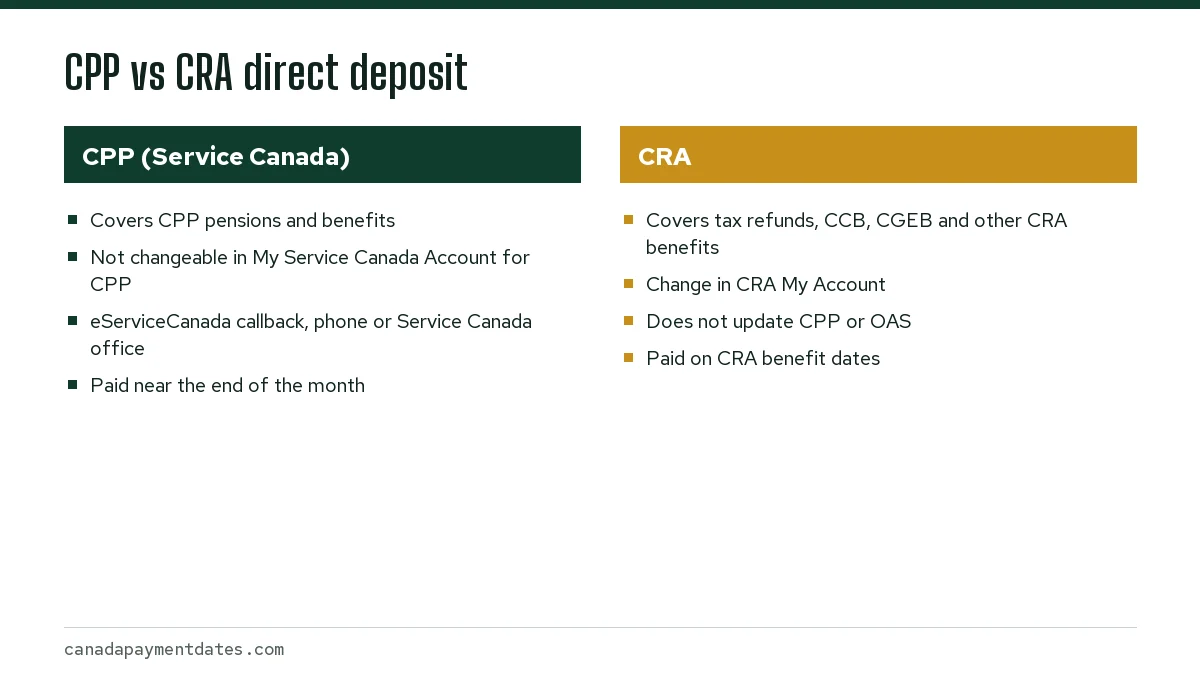
CPP direct deposit is set up with Service Canada, the department that pays the Canada Pension Plan. The CRA runs a different direct deposit file for tax refunds and CRA benefits such as the Canada Child Benefit and the Canada Groceries and Essentials Benefit.
Changing your account in CRA My Account does not update your CPP. The federal direct deposit guide says people who receive several government payments may need to contact more than one department. If you moved banks and only told the CRA, your next CPP deposit will still go to the old account.
For how CRA deposits are timed, see CRA direct deposit time. The rest of this page covers CPP only.
How to change CPP direct deposit
Service Canada's personal information page states that CPP, EI and Canada Disability Benefit recipients cannot use My Service Canada Account to change their information at this time. Old Age Security recipients can, so people who receive both pensions may need two different routes.
Option 1: eServiceCanada callback
Submit the eServiceCanada request form on canada.ca. A Service Canada representative calls you back within 2 business days, verifies your identity and records the new account. This is the fastest route for most people in Canada.
Option 2: in person
Visit a Service Canada office with valid identification and a void cheque or a direct deposit form printed from your online banking. An agent can record the new account during the visit.
Option 3: by phone
You can also call the Canada Pension Plan call centre; the number is on Service Canada's Contact Canada Pension Plan page. Have your Social Insurance Number and new banking details ready.
What do you need to change CPP direct deposit?
- Your Social Insurance Number
- The name of your bank or credit union
- The branch transit number (5 digits) and institution number (3 digits)
- Your account number
- A void cheque, or the electronic direct deposit form most banks let you download
You can find the transit, institution and account numbers along the bottom of a cheque or in the account details section of online banking. Make sure the numbers belong to the account you want the pension paid into, not a savings account you rarely check.
How long a CPP direct deposit change takes
Timing depends on the method and on when in the month you make the change. CPP is paid near the end of each month, and the payment file is prepared ahead of the deposit date. A change recorded a few days before a payment date may not apply until the following month.
| Method | Response | When the new account is likely used |
|---|---|---|
| eServiceCanada callback | Callback within 2 business days | Usually the next payment if done early in the month |
| Service Canada office | Recorded during the visit | Usually the next payment if done early in the month |
| CPP call centre | Handled during the call | Usually the next payment if done early in the month |
Make the change as soon as you open a new account, ideally right after a payment date. The remaining 2026 CPP deposit dates are October 28, November 26 and December 22. The 2027 dates are not yet announced; the full list is on CPP payment dates.
Avoiding a missed CPP payment when you switch banks
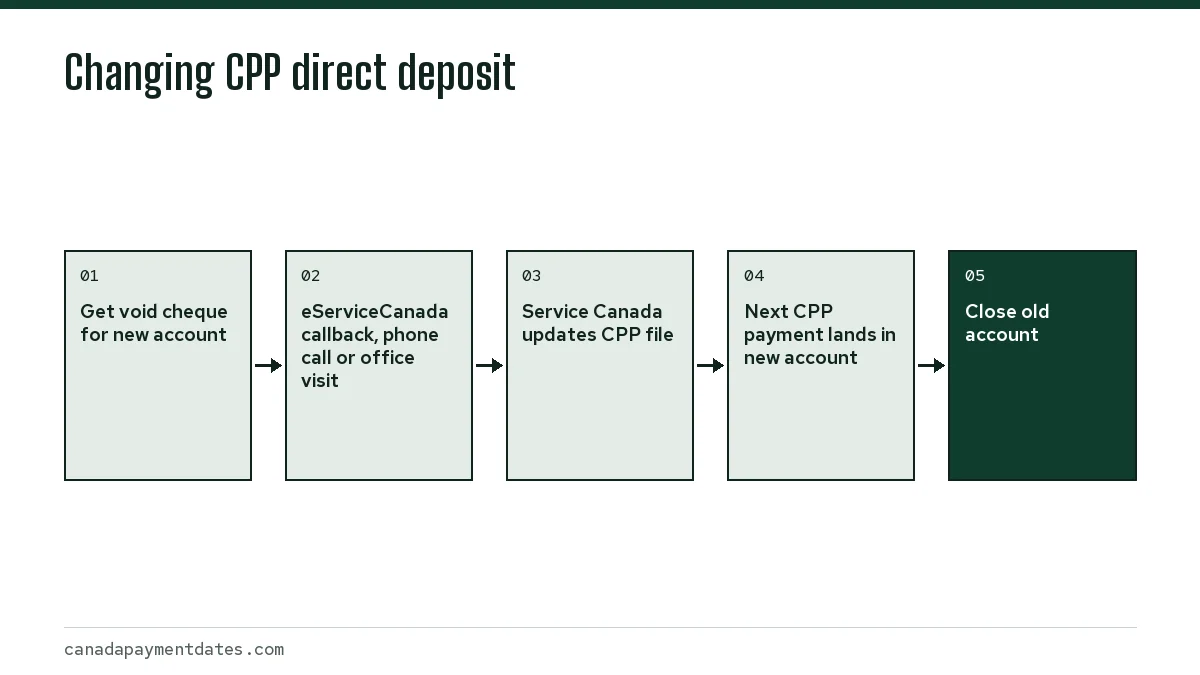
- Open the new account and get a void cheque or deposit form for it.
- Update CPP with Service Canada, and separately update OAS and the CRA if you receive those payments.
- Leave the old account open with a small balance.
- Check the new account on the next CPP payment date.
- Close the old account only after the CPP deposit has arrived in the new one.
If a deposit does not appear, wait a few business days, since canada.ca notes payments can take a few days to arrive, then follow our steps for a CPP payment not deposited.
CPP direct deposit dates, amounts and bank accounts abroad
Direct deposit does not change how much you receive or which day it is paid; it only changes where the money lands. For current amounts see CPP payment amounts, and for the January change see CPP increase.
If you are moving abroad, a Canadian account can stay in place, or you can enrol a foreign account with the Foreign direct deposit enrolment form (8002-501E) in countries where the service exists. That process is explained on CPP outside Canada.
Step by step
Get your banking details
Collect the transit, institution and account numbers and a void cheque for the new account.
Contact Service Canada
Submit an eServiceCanada callback request, call the CPP call centre, or visit a Service Canada office.
Update other payers
Change OAS in My Service Canada Account and CRA benefits in CRA My Account separately.
Confirm the deposit
Check the new account on the next CPP payment date before closing the old one.
Common questions
Can I change my CPP direct deposit online?
Not directly. Service Canada currently does not let CPP recipients change banking in My Service Canada Account. You can submit an eServiceCanada request online and an agent calls you back to make the change.
How do I change my direct deposit for both CPP and OAS?
Change OAS banking in My Service Canada Account, then change CPP separately through an eServiceCanada callback, the CPP call centre or a Service Canada office. Updating one pension does not update the other, and neither one updates the CRA.
If I change my direct deposit with the CRA, does CPP change too?
No. The CRA and Service Canada keep separate banking records. You need to update each one.
What form do I use for CPP direct deposit?
Service Canada does not list a form for CPP; it changes CPP banking through an eServiceCanada callback, by phone or in person. The general Canada direct deposit enrolment form (8001-552E) can take up to 3 months to process by mail.
How do I find my transit and institution numbers for CPP direct deposit?
They are printed along the bottom of a cheque, or listed in the account details or direct deposit section of your online banking. The transit number has 5 digits and the institution number has 3.
What happens if my old account is closed before the change goes through?
The payment cannot be deposited and has to be reissued after your banking information is corrected, so it arrives late. Contact Service Canada as soon as you notice.
Does direct deposit get my CPP to me earlier than a cheque?
It is issued on the same date, but it avoids mail delays. Deposits normally show on the scheduled payment date.
Sources
- Change your personal information with Service Canada canada.ca
- Canada direct deposit enrolment form canada.ca
- Contact Canada Pension Plan canada.ca
- Direct deposit (Government of Canada) canada.ca
- Benefits payment dates canada.ca
- Foreign direct deposit enrolment form canada.ca
We check figures against these official pages. Rules change; confirm anything that affects a deadline or payment with the agency before you act.
Tell us what happened
Describe your situation and our editors will use it to improve this guide. If you leave your email, we may reply with a pointer to the right page or official contact. We never share your details.
Related guides
 CPP Payment Dates: Schedule, Amounts and Missing Payments
CPP payment dates in 2026 fall near the end of each month: January 28, February 25, March 27, April 28, May 27, June 26, July 29,…
CRA Direct Deposit Time: When CCB, CPP and OAS Show Up
There is no published CRA direct deposit time: the Canada Revenue Agency (CRA) issues each benefit on its scheduled date, and the…
How Much Is CPP per Month in 2026: Average and Maximum
How much is CPP per month? In 2026 the maximum retirement pension for someone starting at 65 is $1,507.65, but the average new pe…
Can I Get CPP If I Live Outside Canada? Payments Abroad
Yes, you can get the Canada Pension Plan (CPP) while living outside Canada, because it is based on your contributions rather than…
CPP Increase 2027: When the January Change Is Announced
The CPP increase for 2027 has not been announced. It will equal the change in the Consumer Price Index averaged over November 202…
CPP Payment Not Received or Late? Wait Times and Fixes
If your CPP payment was not deposited or looks late, check the date first: the remaining 2026 Canada Pension Plan payment dates a…